✦ INTELLIGENT PHOTOGRAPHY

See the scene.
Shape the colour.
Capture the moment.

An intelligent Android camera combining scene-aware adjustments, expressive 3D LUT looks, and simple creative control. 100% on-device processing with zero cloud dependency.

✓ 100% Offline Processing
✓ 3D LUT Trilinear Engine
✓ Dual Original + Enhanced Save
✓ Private by Design
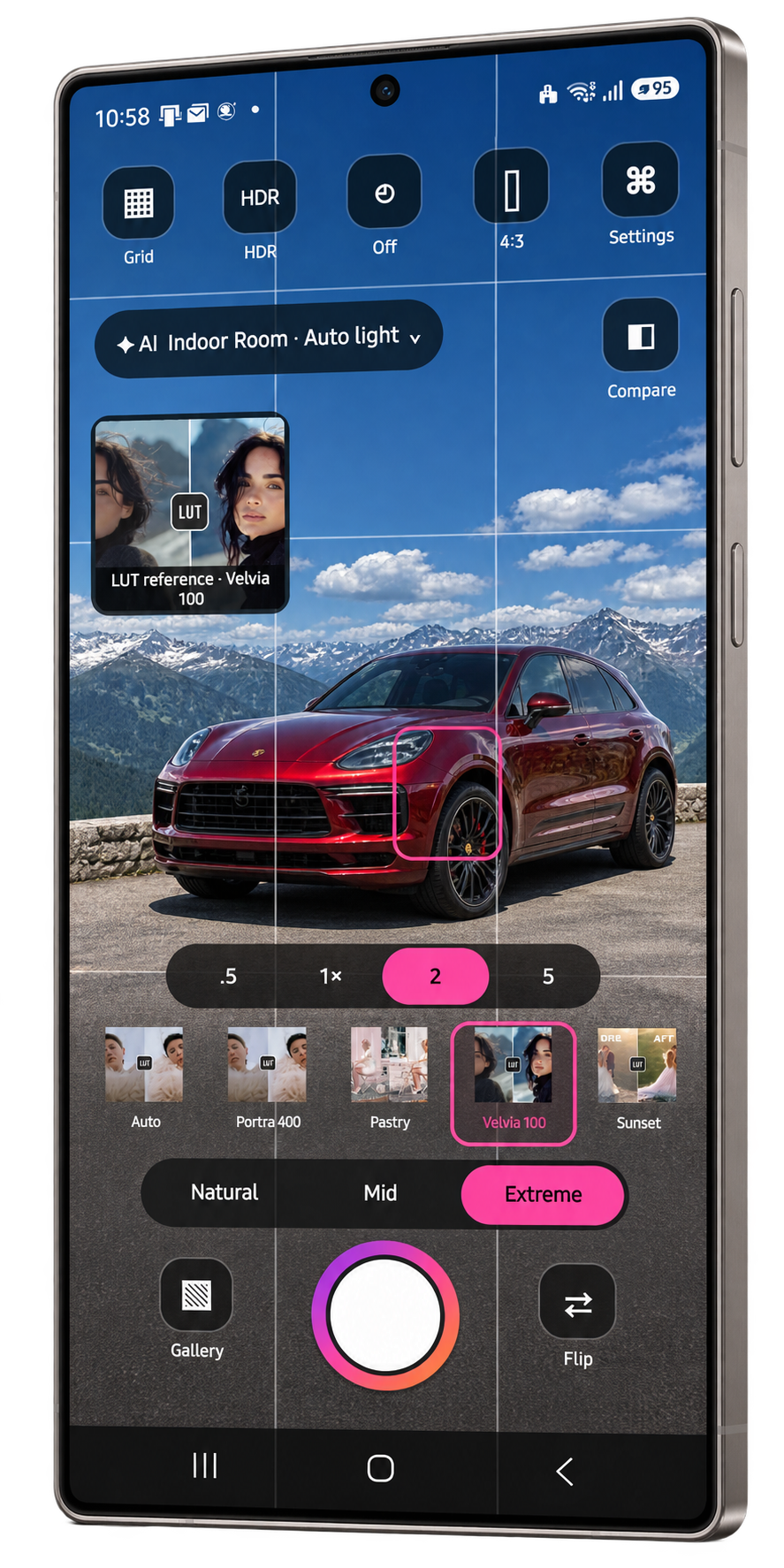
Camera LUT Android Application Viewfinder in Portrait Mode (Extreme Strength Selected)
◉ INTERACTIVE VIEWFINDER

Your camera. Your vision.

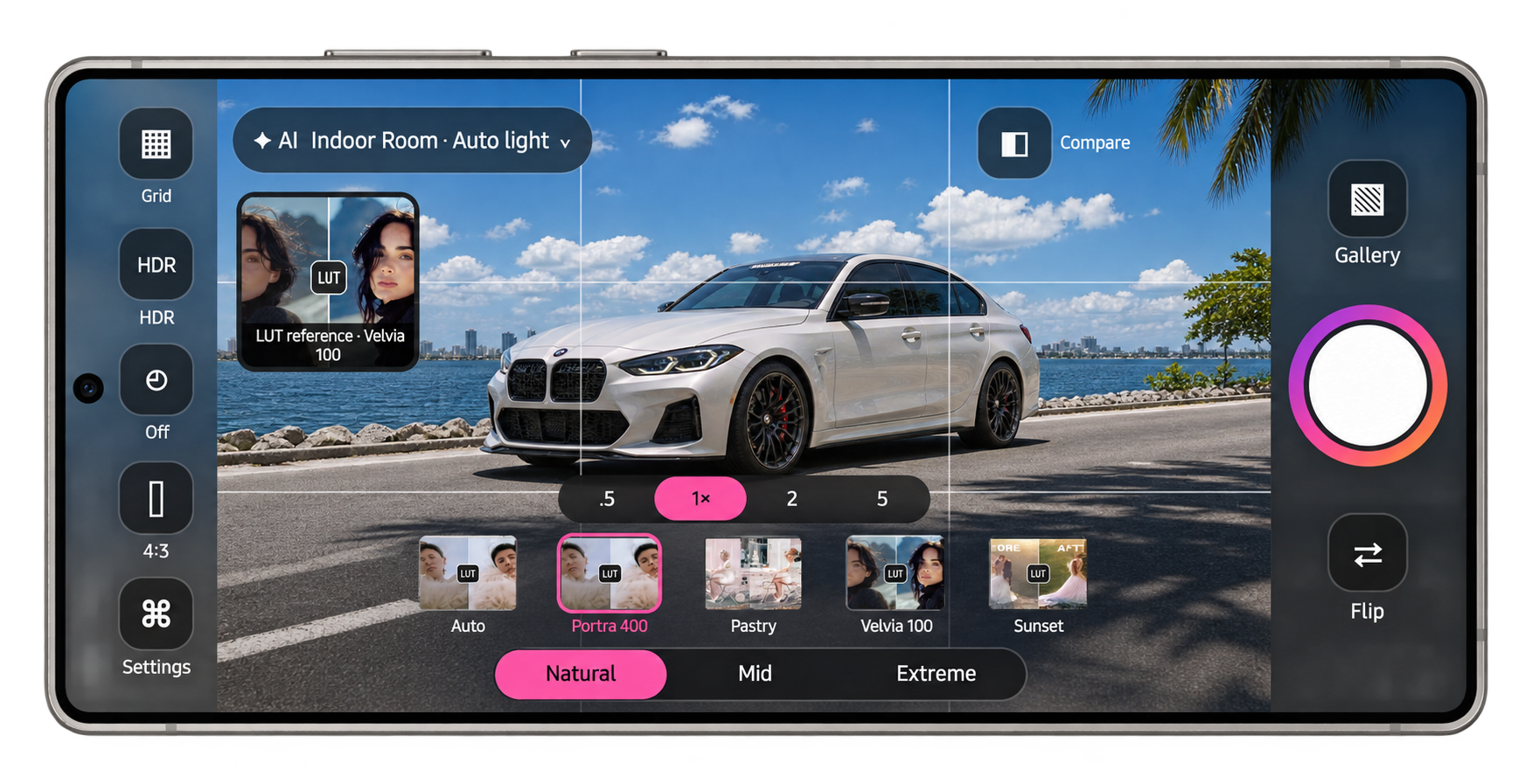
Explore the authentic Camera LUT interface across shooting orientations. Built with tactile precision for one-handed portrait shooting and cinema-style landscape framing.

Camera LUT running on Android Phone in Portrait mode (Extreme strength selected)

💡 Tip: Tap any circular number marker on the camera to inspect that tool's exact behavior.

⚡ INTELLIGENT PROCESSING

A camera that understands the scene.

Before you press the shutter, Camera LUT evaluates lighting, tone distribution, and color balance entirely on your device. Every stage is engineered for instantaneous response without cloud lag.

Camera LUT 6-Stage Image Processing Pipeline Architecture Diagram
01

RAW Sensor Ingestion

Direct ingestion from physical sensor via Android Camera2 API. Full optical resolution with zero downsampling or unrequested spatial noise smoothing.

Camera2 API • Native Resolution
02

Scene & Lighting Analysis

Computes luminance histogram, dynamic range, and dominant color channels. Coupled with Google ML Kit on-device image labeling in ~20 milliseconds.

~20ms On-Device • Zero Cloud
03

Technical Correction

Subtle auto-exposure bias (±0.25 EV), gray-world white balance vectors, +12% shadow lift, and +42% highlight restraint with soft-clip S-curve at 0.86.

Soft-Knee Knee @ 0.86 • EV ±0.25
04

3D LUT Color Volume

Incoming RGB vectors pass through high-precision trilinear 3D .cube lattice interpolation, mapping hues into calibrated cinematic film aesthetics.

Trilinear Interpolation • 3D .CUBE
05

Intensity Blending

Weighted mathematical alpha blend between technically corrected base frame and color-graded volume: Natural (20%), Mid (45%), or Extreme (70%).

Natural 20% • Mid 45% • Extreme 70%
06

Asynchronous Dual Save

Saves both pristine original RAW sensor JPEG and finalized enhanced 3D LUT JPEG to Pictures/SceneCamera without blocking viewfinder frame rates.

Dual JPEG • Pictures/SceneCamera
🎞 3D COLOR PALETTES

One scene. A thousand moods.

Select from meticulously engineered 3D color cubes crafted for distinct environments, lighting conditions, and creative expressions.

⚖ PRECISE INTENSITY

The look you want. The strength you choose.

Dial in exactly how much personality you want in your final photograph. Three deliberate intensity weights tailored for candid authenticity, balanced film tones, or bold cinematic styling.

45%

Mid Strength Mode (Signature Look)

The default sweet spot. Striking a confident balance between filmic color harmony and realistic texture. Lifts shadows, restrains harsh specular highlights, and reveals rich color nuances.

Alpha Weighting:
FinalPixel = (1 - α) × TechnicalBase + α × 3D_LUT_Sample
where α = 0.45. Preserves fine micro-contrast while imparting calibrated palette harmonics.
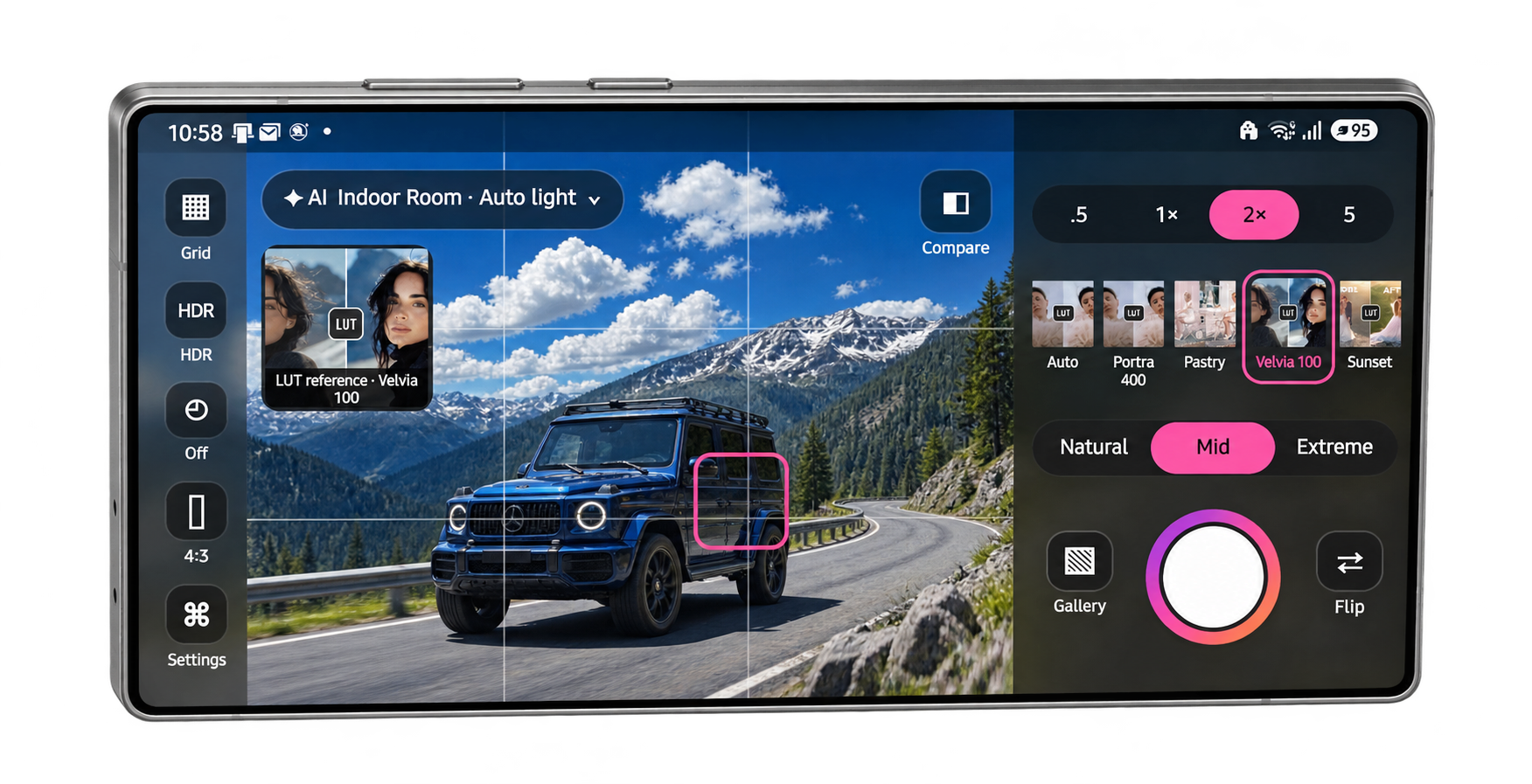
Camera LUT previewing Mid strength mode on device
⚙ PHOTOGRAPHER CONTROLS

Everything you need. Nothing you don't.

Designed by photographers, for photographers. Every primary control is immediately accessible on the viewfinder without digging through nested sub-menus.

▦
3×3 Framing Grid Instant Toggle

Overlays high-contrast rule-of-thirds grid lines for leveling horizons, balancing architectural perspective, and centering portraits.

HDR
Native Sensor HDR Hardware Level

Toggles native multi-exposure bracket integration on supported Camera2 sensors for clean sky retention and expanded highlight range.

⏱
Self-Timer Off / 3s / 10s

Three-state timer control. Ideal for tripod long exposures, group portraits, and eliminating hand-shake vibrations on shutter tap.

4:3
Full Sensor Framing Sensor Aspect

Captures the maximum physical sensor resolution in 4:3 aspect ratio without non-optical digital letterboxing or image cropping.

✦
AI Scene Understanding On-Device ML

Real-time scene classifier pill. Evaluates luminance and context. Tap anytime to view the active scene reading or select manual override.

◧
Instant Compare Pill Hold to Compare

Press and hold to bypass the 3D LUT look and see the un-graded raw sensor feed in the viewfinder. Release to immediately resume color grading.

🔍
Precision Zoom (.5, 1×, 2, 5) Optical + Sensor Crop

Clean step switches: switches physically between ultra-wide (.5) and standard (1×) sensors, with calibrated center sensor crops for 2× and 5×.

🎞
Horizontal LUT Strip Swipe Selector

Ergonomic horizontal tray above the shutter. Swipe with your thumb to audition color grades with instant real-time viewfinder feedback.

⚖
Strength Selector 20% / 45% / 70%

Fast segmented control to dial in color intensity: Natural (20%), Mid (45% signature), or Extreme (70% bold) with zero menu navigation.

◉
Responsive Shutter Zero Lag Trigger

Tactile glowing shutter button. Dispatches background processing immediately so your viewfinder never freezes during rapid shooting.

🖼
Gallery Quick Launcher Direct Shortcut

Tapping the bottom-left thumbnail immediately opens your photos in Pictures/SceneCamera within your device's preferred gallery app.

↺
Sensor Flip Front / Rear

Smoothly switches between the primary rear camera array and the front-facing selfie camera with full 3D LUT color grading support on both.

🚀 QUICK START WORKFLOW

From opening the camera to your next favourite shot.

How Camera LUT simplifies creative mobile photography into five natural, frictionless steps.

01

Open & Frame

Launch directly into the clean viewfinder. Use the 3×3 grid and center autofocus reticle to compose your subject with confidence.

02

Scene Reading

Observe the on-device AI scene pill. The camera instantly evaluates your lighting conditions, exposure levels, and environmental tone.

03

Choose Your Look

Keep Auto for intelligent adaptive grading, or swipe the LUT strip to choose Portra 400, Velvia 100, Sunset, Night, or Tri-X 400.

04

Set Your Strength

Choose Natural (20%), Mid (45%), or Extreme (70%) with a single tap. Press and hold Compare (◧) to check against the raw sensor frame.

05

Capture & Keep Both

Press the shutter. Both the original pristine RAW frame and the enhanced LUT JPEG are saved instantly to Pictures/SceneCamera.

🔬 MATHEMATICAL PRECISION

Beautiful colour is engineered.

Behind every frame is a calibrated mathematical pipeline designed to tame harsh smartphone sensors and deliver organic filmic roll-off.

Camera LUT Technical Tone Curves and Soft-Knee Roll-Off Graph
±EV

Intelligent Exposure Bias

Analyzes frame histograms to bias exposure by ±0.25 EV, preventing highlight blowout on bright skies while preserving deep shadow tones.

WB

Gray-World White Balance

Extracts spatial illuminant estimates to gently adjust red and blue gain vectors, neutralizing unnatural green casts common in mobile sensors.

S

Exponential Soft-Knee Compression

Applies an exponential shoulder knee at 0.86 to gently compress specular highlights into pure white, recreating authentic analog film roll-off.

3D

Trilinear 3D Lattice Interpolation

Instead of crude 1D RGB channel curves, Camera LUT uses a full 3D tetrahedral cube lattice to shift hues, luminance, and saturation interdependently.

★

Developed by NextGen TechEdge Solutions

Engineered in India with world-class colour science and computational imaging principles. Learn more at nextgentechedge.com.

❦ OUR PHILOSOPHY

“Less editing. More photographing.”

Modern mobile photography has trapped photographers in an endless post-processing loop: shoot a flat, clinical smartphone photo, export it into a heavy editing app, spend ten minutes fiddling with sliders, and repeat.

Camera LUT returns the joy to the moment of capture. By seeing your finished film grade live in the viewfinder with intelligent scene assistance, you frame with intention and capture ready-to-share photographs straight from the shutter.

100% Offline & Private
Your photographs never leave your device. Zero internet permissions, zero cloud servers, zero behavioral tracking.
Dual Save Protection
Every shutter tap saves both the original unaltered sensor JPEG and the enhanced 3D LUT output.
Camera LUT viewfinder in landscape mode showing sunset lake

Camera LUT viewfinder in Natural mode (20% blend) capturing landscape light

? QUESTIONS & ANSWERS

Questions, answered.

Everything you need to know about Camera LUT compatibility, workflow, color science, and privacy.

Camera LUT is an intelligent Android camera application developed by NextGen TechEdge Solutions. It combines real-time scene and lighting analysis with curated 3D LUT (Look-Up Table) color palettes to deliver rich, film-inspired photographs directly from the camera shutter without requiring post-capture editing apps.
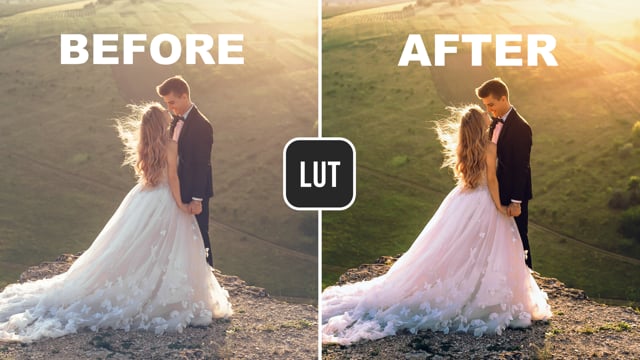
A 3D LUT is a three-dimensional mathematical cube lattice that maps input colors (Red, Green, Blue) to precisely calibrated output colors. Unlike simple 1D filters that only adjust brightness or contrast across single channels, a 3D LUT can shift complex color relationships—such as warming skin tones while keeping blue skies rich and shadows cool.
No. Camera LUT is 100% offline. The application does not declare or use the android.permission.INTERNET permission. All ML Kit scene classification, technical corrections, and 3D LUT color transforms happen entirely on your phone's processor. You can shoot in remote mountains, airplanes, or subways without any network connection.
Camera LUT requires Android 10 (API level 29) or higher, with verified compatibility through Android 15/16. The device must support standard Android Camera2 API hardware levels (LIMITED, FULL, or LEVEL_3).
Captured photos are saved to your device's public media storage in the Pictures/SceneCamera folder. They are instantly accessible through your phone's default Gallery, Google Photos, or any standard Android photo viewer.
Never. Camera LUT utilizes an asynchronous Dual Save architecture. Every shutter tap writes two distinct full-resolution files: ..._ORIGINAL.jpg (the pure sensor capture) and ..._ENHANCED_<Scene>_<Strength>.jpg (the finalized graded photo). You never lose your raw capture.
On the camera viewfinder, you'll see a dedicated Compare button (◧). Simply press and hold it: the viewfinder instantly reverts to the un-graded raw sensor feed. Release your finger, and the live 3D LUT look immediately returns.
Strength controls the alpha blend weighting between the technically balanced base frame and the color grade: Natural (20%) provides subtle, documentary-like color enhancement; Mid (45%) is our signature balanced aesthetic; and Extreme (70%) delivers bold, high-contrast cinematic styling.
None whatsoever. Camera LUT has no accounts, no logins, no analytics SDKs, and zero cloud endpoints. Your photos stay strictly on your local hardware. Read our full Privacy Policy for complete technical details.
Camera LUT is currently undergoing closed beta testing (version 0.9 Beta). The public production release on the Google Play Store is scheduled for early 2026. Bookmark this page or contact [email protected] for beta access inquiries.
✦ READY FOR YOUR POCKET

Your next great photograph
starts here.

Experience intelligent scene understanding, curated film color science, and 100% on-device privacy on your Android smartphone.

Coming soon on Google Play (v0.9 Beta in Closed Testing)
User Guide & Support →

Compatible with Android 10+ devices • Developed by NextGen TechEdge Solutions Private Limited